Type your business into an AI website builder and by the time your coffee’s done, you’ve got a live site. Clean homepage, matching colors, stock photos that almost pass for your storefront. It’s tempting to stop right there.
Here’s the direct answer: for most local businesses, WordPress is still the better long-term platform. AI builders like Wix, Squarespace, and Hostinger’s AI tools can get you online fast and cheap, but they trade away search visibility, ownership, and flexibility to get you there. WordPress costs a little more upfront and takes a little longer to launch. It gives you a site you actually own, built to rank and convert instead of just exist.
Why So Many Local Business Owners Are Trying AI Builders First
We get why AI builders are appealing. A landscaping company that’s put off a website for two years doesn’t want a six-week build and a five-figure invoice. They want something live by Friday. AI builders sell speed and a low monthly price, and for a business with no site at all, that beats nothing.
The problem usually shows up around month four or five, once the owner notices the phone isn’t ringing any more than it was before they had a website.
What’s Actually Different Between WordPress and an AI Builder?
WordPress is open-source software you install on hosting you control, with access to over 59,000 available plugins and thousands of themes for building out exactly what your business needs. AI website builders, like Wix, Squarespace, and Hostinger AI, are closed platforms. You don’t own the code. You rent space inside their system, and your site lives on their infrastructure by design.
That distinction sounds technical. In practice, it decides whether you can move your site, customize how it works, or fix a problem yourself instead of waiting on a platform’s support queue.
Where AI Website Builders Fall Short for Local Businesses
AI builders are genuinely good at one thing: getting a decent-looking site live fast. Where they consistently fall short is everything that happens after launch.
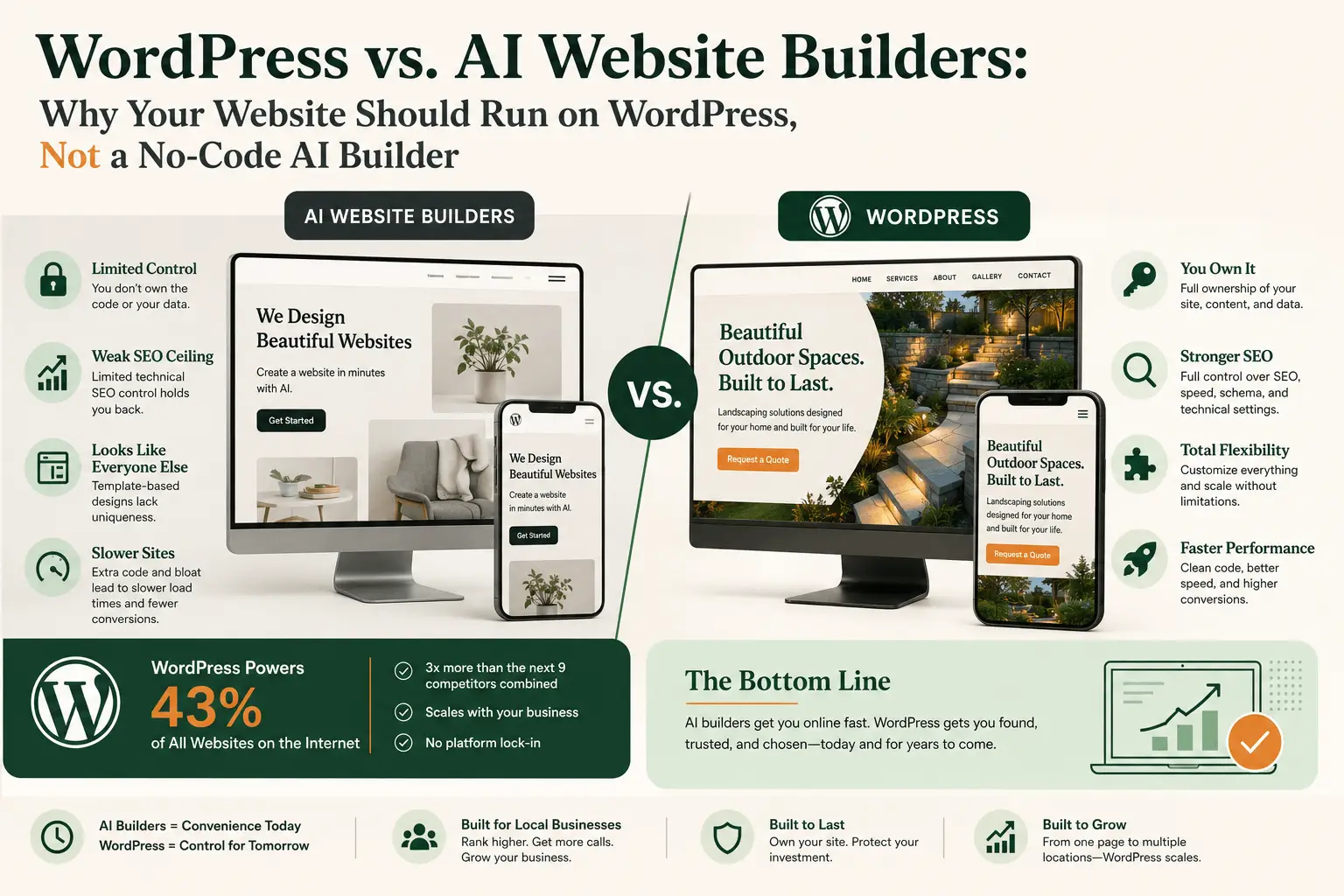
SEO control is limited. Most AI builders handle the basics, a title tag here, a meta description there, but they don’t give you control over the technical elements that actually move rankings: schema markup, clean URL structures, crawl efficiency, and page speed at the code level. Closed, template-based platforms simplify site building but cap how much technical SEO control you actually get. For a plumber competing for “plumber near me” in a crowded metro, that ceiling matters.
The sites tend to look the same. AI builders generate layouts by pulling from patterns they’ve already seen thousands of times, which creates real trade-offs once a business has an established brand to protect. Walk through any local business district and you can usually spot the templated sites. They’re not bad. They’re just interchangeable, and interchangeable doesn’t win the click when a homeowner is comparing three roofers at once.
You don’t own what you build. This is the one that costs businesses the most down the road. Close a Wix or Squarespace account, or decide to switch platforms, and in most cases you’re starting from scratch. There’s no clean export of a fully functional site. WordPress, by contrast, is portable. Change hosts, change developers, change your whole design, and the content and structure move with you.
Code bloat slows things down. AI-generated sites often ship extra code that isn’t optimized for your specific pages, which drags down load times. That matters more than it sounds like it should. Google’s own research found that a one-second delay in page load time can cost 7% in conversions. A homeowner who’s already annoyed their disposal is broken isn’t going to wait around for a slow site to load.
Why WordPress Still Runs Almost Half the Internet in 2026
WordPress currently powers somewhere around 43% of all websites on the internet, according to W3Techs, the most widely cited source for CMS market data. That’s not 43% of websites that use a CMS. That’s 43% of every website, period, which puts WordPress at roughly three times the combined market share of the next nine most popular platforms, including Shopify, Wix, and Squarespace together.
That dominance isn’t an accident. WordPress has stuck around because it does the two things a growing local business actually needs: it scales, and it doesn’t lock you in. A single-page starter site today can become a full multi-location business site three years from now without a platform migration. Try doing that inside most AI builder ecosystems and you’ll hit a wall.
We cover the fundamentals of what makes a site worth building on in our small business website design guide, but the short version is this: the platform you pick on day one determines how much work it takes to fix things on day 500.
Ownership Is the Real Difference, Not Just Looks
The appeal of an AI builder is that you don’t have to think about hosting, security, or updates. Fair enough. But that convenience comes at the cost of control, and for a business that depends on its website to generate calls, control is the thing you actually want.
With WordPress, you choose your hosting. You choose your plugins. You’re not locked into a single company’s roadmap, pricing changes, or feature decisions. If a hosting provider raises prices or a platform sunsets a feature you depend on, you’re not stuck. That’s the tradeoff in plain terms: AI builders optimize for convenience today, WordPress optimizes for control over the life of the business.
When an AI Builder Might Actually Make Sense
To be fair, AI builders aren’t wrong for every situation. If you need a single landing page for a pop-up event, a temporary campaign page, or you’re testing whether a new service idea has any demand before investing real money, an AI builder can get something live in an afternoon, and that’s a reasonable use of the tool.
The mistake isn’t starting with a builder. It’s staying on one long after your business has outgrown it, once your website needs to actually perform, rank, and convert instead of just exist.
What This Looks Like in Practice
Take a landscaping company that launched on an AI builder two years ago because it was fast and cheap. The site looks fine. But it’s never ranked for “landscaping near me” in their city, the mobile version loads slowly during peak search hours in spring, and every time they want to add a new service page for hardscaping, they’re stuck inside the builder’s rigid section structure.
We’ve watched this exact pattern play out with local businesses across the trades. It’s rarely that the AI-built site is broken. It’s that it was never built to compete, and by the time an owner notices, they’ve usually lost a season or two of leads to a competitor who ranks higher.
Move that same business onto WordPress with a proper local SEO foundation, and the picture changes. Service pages can be built and structured specifically to target local search intent. Page speed can be optimized at the code level instead of fighting the platform’s defaults. And when the business adds a second crew and wants to expand into a neighboring county, the site scales with it instead of requiring a rebuild.
At Hometown Digital, our website design packages start at $295 setup and $45 a month, including hosting, security, and ongoing maintenance, all built on WordPress from day one. That’s on the lower end of what a small business website actually costs once you factor in what most agencies charge for something comparable. It’s not the cheapest possible option on the market. It’s the option built to keep working for your business past the first year.
Common Questions About WordPress vs. AI Website Builders
Is WordPress harder to use than an AI website builder?
The initial setup takes more coordination, since you or your agency choose hosting, themes, and plugins. Once it’s built, day-to-day editing, updating a phone number, swapping a photo, adding a blog post, is comparable to any other platform.
Can I switch from an AI builder to WordPress later?
Yes, but expect a rebuild rather than a simple transfer. Most AI builders don’t allow a clean export of your design and content, so migrating usually means recreating the site rather than moving it as-is.
Do AI website builders hurt my SEO?
Not automatically, but they limit how much you can improve it. Most AI builders handle basic SEO fields like meta descriptions, but restrict access to schema markup, technical crawl settings, and code-level speed optimization, all of which matter for competitive local rankings.
Is WordPress more expensive than an AI builder?
It depends on how you build it. A DIY WordPress site can cost less than a premium AI builder plan. A professionally built and maintained WordPress site, like Hometown Digital’s packages starting at $295 setup and $45 a month, costs more than an AI builder’s entry tier but includes hosting, security, and a site built to convert, not just exist.
What if I already have a site on Wix or Squarespace?
It’s not an emergency to rebuild immediately, especially if the site is working. But if your rankings have stalled, your mobile speed is slow, or you’re hitting the platform’s customization ceiling, that’s the signal it’s time to move to something you can actually control.
Ready to Get More Customers?
If you’re not sure whether your current site is actually working, get a free website audit from us. We’ll look at your site specifically and tell you what’s converting, what isn’t, and what we’d fix first.